
WinSCP
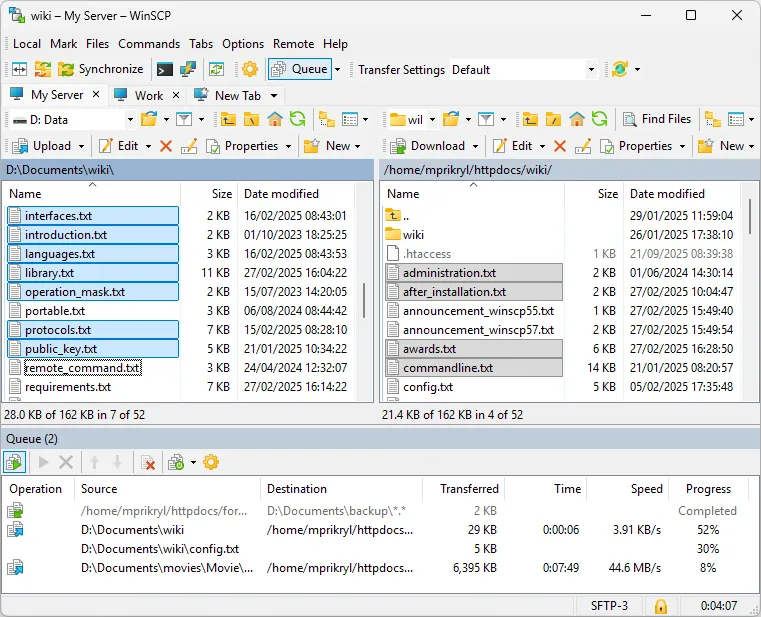
File manager for Windows that transfers files to Linux and Unix servers over SFTP, SCP and FTP, with a two-pane view and sync.
What it does
- Two-pane file manager for local and remote folders
- SFTP, SCP, FTP and FTPS protocols, with SFTP recommended
- Synchronise folders and compare what differs
- Edit a remote file in a local editor and upload the change
- Scripting and command-line automation
WinSCP gives you a familiar two-pane file manager for remote servers. Most administrators use it to move configuration files, logs and backups between Windows and Linux systems without a command line.
Who it is for
WinSCP suits Windows administrators who work with Linux servers and want drag-and-drop transfers with a clear queue. For regular automated jobs, the scripting interface is a better fit than manual use.
Install and first run
- Download the installer from the official download page.
- Create a new session, choose SFTP, and enter the server, port and username.
- Select your authentication method, such as a private key.
- Verify the host key fingerprint before you accept it.
- Drag files between the panes and watch the queue.
The step-by-step workflow is in transferring files to Linux servers.
Practical notes
- Use key-based login and a dedicated transfer account with limited folders.
- Do not save passwords in sessions on shared PCs.
- Check the transfer queue for failed items before you close the program.
Common tasks
Questions and answers
Which protocol should I use?
SFTP. It encrypts both the login and the data. Use plain FTP only on isolated networks where your policy allows it.
Why does WinSCP ask me to accept a host key?
It is checking that the server is the one you expect. Compare the fingerprint with the value your server team gives you before you accept.
How do I use an SSH key?
Choose the private key in the session authentication settings. WinSCP uses the .ppk format, which PuTTYgen can create or convert from an OpenSSH key.
Can WinSCP run on a schedule?
Yes, through its scripting interface and Windows Task Scheduler. Use a dedicated account with limited folder access for scheduled jobs.
Guides that use WinSCP
- Review and Upload Scripts to Linux with WinMerge and WinSCPA review-then-upload workflow for deploying configuration and scripts to Linux servers: compare locally with WinMerge, then transfer with WinSCP.
- Archive Large Logs and Move Them Over SFTPHow to find oversized log folders with WinDirStat, compress them, and move the archives to a secure storage server with WinSCP.
- Secure File Transfer Checklist for WinSCPA checklist of settings to verify before you use WinSCP for server transfers: protocol, host keys, authentication, logging and saved sessions.
- SSH Keys and Server Passwords in KeePassXC for WinSCPHow to keep SSH private keys and server passwords in a KeePassXC database, and use them with WinSCP without leaving secrets on the desktop.
- Transfer Files to Linux Servers from Windows with WinSCPA beginner-friendly workflow for copying configuration files, logs and backups between a Windows PC and Linux servers using WinSCP over SFTP.