
Greenshot
Open source screenshot tool for Windows with an editor for arrows, text, highlights and blur, for documenting steps and tickets.
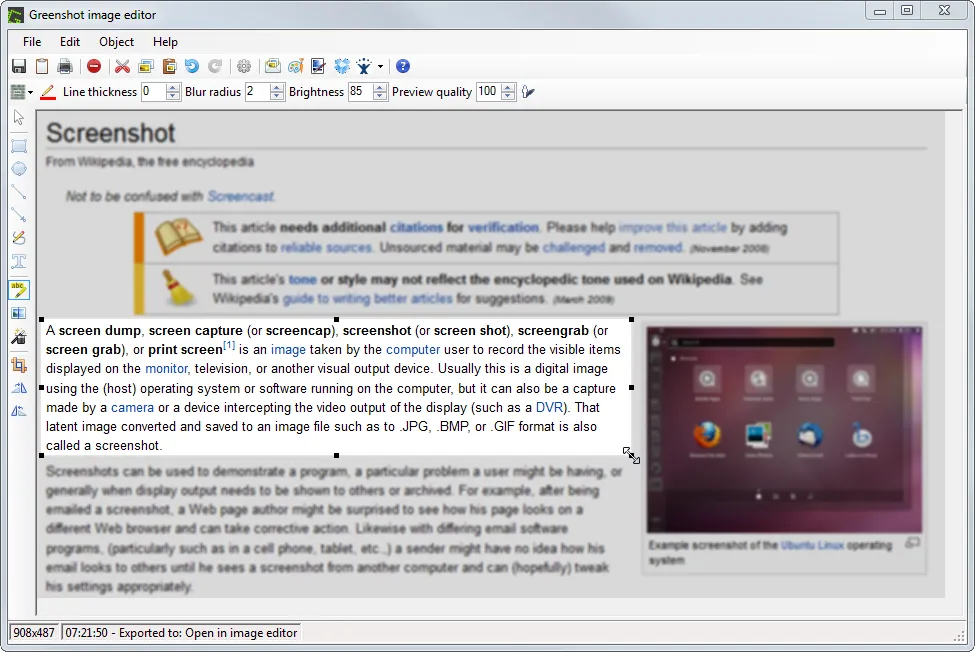
What it does
- Capture a region, window or full screen with a hotkey
- Editor with arrows, rectangles, text, highlights and numbered steps
- Blur tool to hide names, addresses and hostnames
- Save to file, copy to clipboard or send to a printer
Greenshot captures a region, window or full screen, then opens it in an editor where you can add arrows, text, highlights and blur. It is a quick way to show a colleague or a user exactly what to click.
Who it is for
Greenshot suits anyone who writes procedures, helpdesk replies or audit evidence on Windows. It is light, starts quickly and works offline.
Install and first run
- Download the program from the official downloads page and install it.
- Press the capture hotkey and select the region.
- Add markup in the editor: a box around the error, an arrow to the button, a short label.
- Blur any personal or internal details.
- Save the file with the naming scheme your team uses.
The helpdesk method is in annotated screenshots for helpdesk tickets.
Practical notes
- Capture only the area that matters. Smaller images are easier to read and reveal less.
- Use one message per image. Two problems need two captures.
- Store originals next to annotated copies, as described in the storage guide.
Common tasks
Questions and answers
Does Greenshot send my screenshots anywhere?
No. It saves captures on your PC unless you choose to share them. Check any plug-ins you enable, since they may add export targets.
How do I blur sensitive data?
Use the blur tool in the editor on each region before you save or share. Check the whole image, not just the obvious field.
Can I change the screenshot hotkey?
Yes, in the preferences. Change it if it conflicts with another program.
Is Greenshot different from the Snipping Tool?
Greenshot is built for annotation and documentation. It offers more markup tools and a faster capture-to-file workflow than the Snipping Tool.
Guides that use Greenshot
- Write Helpdesk Tickets with Annotated ScreenshotsHow to capture and mark up screenshots with Greenshot so that helpdesk tickets are clearer, faster to resolve and safe to share.
- Write a Disk Cleanup Policy for Corporate PCsHow to define what may be cleaned on corporate Windows PCs, how to find the largest space users, and how to document the policy with screenshots.
- Document a Network Inventory with Annotated ScreenshotsHow to combine Advanced IP Scanner results with Greenshot annotations to produce a clear network document that a new administrator can follow.
- Store and Name Screenshots for AuditsA naming and retention scheme for Greenshot captures used as audit evidence, so that changes and approvals can be found and verified later.
- Document Configuration Changes with Side-by-Side ScreenshotsHow to record a configuration change with a WinMerge comparison and Greenshot captures, so that reviewers and auditors can see what changed and why.